Consider:
- task lighting such as a reading lamp
- natural and environmental light such as windows
- environmental light such as room lighting
- brightness and glare





There are many ways to make reading easier and more enjoyable for children and young people with vision impairment. This page explores how to adapt your child’s reading environments, information on reading aids, and how professionals can help your child choose the right tools.
Every child reads differently. The right equipment and environment can help your child read more easily and for longer. Reading aids may change over time as your child’s vision and skills develop. Your child’s skill and willingness when using a particular aid or technique is also important.
There are lots of different accessibility options, so it’s important to consult eye health, social care and education professionals before deciding what to buy or put in place for your child.
When you’re trying things out for yourself at home, take it one step at a time. Give your child time and space to explore what feels comfortable and enjoyable for them.
For information on specialist formats, reading providers and resources, visit our page on accessible formats and providers.
Specialist professionals can give advice tailored about reading aids and environments that work best for your child. These include:
These specialists can recommend tools and adaptations, and in some cases provide free equipment to support more with reading.
Find out more about the professionals who can support you and your child:
For early guidance, contact your QTVI and Low Vision Clinic.
Local sight loss organisations may have resource bases or equipment centres where you can try out equipment. Please note that these organisations may not provide child-specific training to their staff and volunteers.
For help with funding specialist equipment for use at home, look at RNIB’s grant scheme:
Simple changes and everyday tools can make a huge difference. Magnifiers, appropriate lighting, and tactile or sensory items can help your child stay engaged with reading for longer
In certain circumstances, image description may also be helpful. There are many different options that could work for your child depending on whether they’re out in public or reading at home.
Each child is different and their needs may change over time. Approaches may change as a child learns new skills and matures. If you’re unsure where to start or what’s changed, get support from a professional.
Consider:
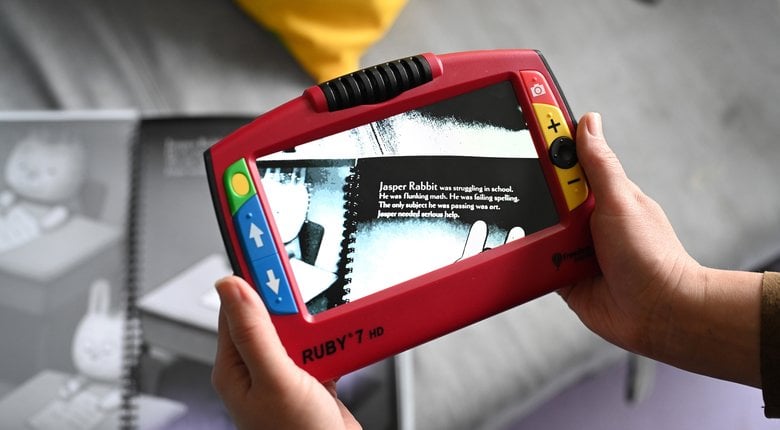
Optical magnifiers come in many different types, including:
You can add interest to a story by using tactile objects to represent characters, locations, or other elements. For example:
Image descriptions may be useful when an image in a reading resource enriches or enhances the text or story. The way images are described varies depending on what that image is communicating and how it relates to the text. Image descriptions commonly include:
Some specialist reading materials may come with readily available image descriptions, whereas others may need you to come up with an image description as you’re reading.
Digital books can be read on screen, listened to, or read on a braille display.
There are lots of different options available and this can be confusing at first. Some of these options are specialist and may be expensive, but many mainstream options with built in accessibility tools are available at low or no extra cost.
High-tech devices include:
A professional will be able to recommend suitable technology and teach your child specialist technology skills for use in education and at home.
Most devices include accessibility settings you can adjust, such as:
Accessible files, such as .docx or APDFs can often be read aloud using built-in or downloaded tools. It’s also possible to find accessible versions of some reading materials that are out of copyright on publicly open websites.
Apps can help with adapting visual displays in a variety of ways, including:
Some apps allow users to take a photo of a page of printed or handwritten text and read it aloud. Other apps can convert printed or handwritten text to digital text.
Many screen readers and specialist apps will read out or create image descriptions. Images in eBooks or on websites that aren’t described on the page may have image descriptions in alt-text which a screen reader will read out. Images that aren’t relevant to a text may not be described. Some apps will generate a description of any digital image or photo that’s uploaded to them.
Some devices are particular to a task, such as reading e-books, whereas others are more versatile. Options include:
Specialist reading devices can be expensive and very specific. Talk with professionals such as your QTVI to work out what meets your child’s needs. They may be able to provide equipment or support a grant application for high-cost items to be used at home.
Find more guidance in our reading and writing technology guides
RNIB provides free, specialist advice and support for children and young people with vision impairment – from birth to age 25 – and their families.
If you can’t find what you’re looking for, or you’d like more information about anything mentioned on this page, we can help.
We offer:
Please contact our Helpline on 0303 123 9999.